RFC 10008 and the HTTP QUERY Method: A Complete Engineering Handbook for Building Framework-Agnostic Search APIs

On this page
Introduction: An Awkward Gap Left Open for 16 Years
Welcome, everyone! Today, we are going to have an informal chat about a fascinating topic in backend engineering. Are you ready?
Believe me, while working on backend systems, I have run into this frustration more times than I can count. There comes a day in every backend engineer's career when you have to build a complex, heavily customized search or filtering API. That is exactly when you collide with an old, awkward limitation in the HTTP protocol.
As we all know, the GET method follows the rules strictly. It is safe and idempotent like a well-behaved student, and you can cache its responses easily. The real problem is that you are forced to cram every single piece of data into a tiny URL string. On the other hand, the POST method is a bit of a rebel that breaks the usual reading rules by allowing you to send as much data as you want inside the request body. However, according to standard HTTP semantics, POST is designed for changing server state, not for read-only search operations, right?
This article is not just a dry theoretical lecture. It is a complete engineering handbook! We will break down every practical detail of RFC 10008, framework-agnostic implementation principles, a real-world reference implementation using Python and FastAPI, actual infrastructure limitations, security considerations, and the current adoption status across the tech ecosystem. No matter which programming language or framework you use daily, you will be able to implement this method in your own projects after reading this guide.
Where Exactly Do GET and POST Fail Us?
Why do we actually need something new? Let us break down the reasoning. RFC 10008 outlines four concrete reasons why the GET method falls short for complex queries:
- Uncertain URL Length Limits: When a request travels to your server, it passes through multiple proxies, load balancers, and Content Delivery Networks along the way. Each of these intermediaries enforces its own arbitrary URL length limit. If you send a slightly larger filtering payload, one of those systems will drop your request halfway through.
- Privacy Risks and Data Leaks: URLs are routinely stored in plain text inside access logs, browser histories, and referrer headers. If your search filters contain sensitive customer data, that information is accidentally leaked to everywhere the URL is recorded. Does that make sense?
- Messy and Unreadable Query Strings: We all know how terrible a nested filter object looks when you try to serialize it into a URL query string. Representing structures like price ranges, multiple categories, and sorting arrays in a URL makes the code almost impossible to read and maintain.
- Infrastructure Confusion: When you are forced to fall back on the POST method for searches, your load balancers and caching layers have no way to know whether the operation is a read or a write. As a result, critical infrastructure decisions regarding caching, automated retries, and rate limiting become completely flawed.
A Bit of History: From an 11-Year Draft to an Official RFC
Back in 2010, the PATCH method was introduced to the HTTP protocol, and 16 long years have passed since then. Can you believe it? After 16 years, this is the very first time a completely new general-purpose method has been added to HTTP!
The initial draft for the QUERY method (draft-ietf-httpbis-safe-method-w-body) was iterated on for years inside the HTTP Working Group. It was finally approved by the IESG on November 20, 2025, and on June 15, 2026, the RFC Editor officially published it as RFC 10008. This document is a 24-page Proposed Standard written by Julian Reschke (greenbytes), James M. Snell (Cloudflare), and Mike Bishop (Akamai). It was truly a 16-year wait worth celebrating!
Exploring the Core of RFC 10008
Let us look at the technical details. What exactly is the specification telling us to do?
Definition and IANA Registration
According to the RFC, a QUERY request instructs a resource to process the attached content in a safe and idempotent manner, and then return the resulting output as a response. In the IANA HTTP Method Registry, it is officially recorded like this:
| Method Name | Safe | Idempotent | Specification |
|---|---|---|---|
| QUERY | Yes | Yes | Section 2, RFC 10008 |
What do safe and idempotent actually mean? Think of an idempotent operation like a gentle, well-behaved child in a house. No matter how many times you ask them to perform the same task, they will never break any furniture or disrupt the room, which means the server state remains completely unchanged. Your networking infrastructure now knows for certain that this request will cause no harm. If a network connection drops halfway through, you do not need to worry because the request can be safely retried automatically, exactly like a GET request!
A Request Body Does Not Mean JSON: Content-Type is King
This is exactly where most developers make a common mistake. Everyone assumes that having a request body means you must send JSON. That is simply not true! Understanding this concept is crucial if you want to build framework-agnostic systems.
The RFC does not enforce any strict format for the body of a QUERY request. The payload body and the Content-Type header work together to define the exact query structure. This means you can send JSON, application/x-www-form-urlencoded, standard GraphQL syntax, or even a custom SQL-like domain-specific language that you designed yourself! The only requirement is that both the client and the server must understand and agree on that specific Content-Type. Take a look at this excellent example provided directly in the RFC:
QUERY /contacts HTTP/1.1Host: example.orgContent-Type: application/x-www-form-urlencodedAccept: application/json
select=surname,givenname,email&limit=10&match=email=*@example.*
Content-Type Validation is Mandatory
According to the RFC, a server must reject any request that has a missing or inconsistent Content-Type header. When a mismatch occurs, the server must return an appropriate HTTP error status such as 400 Bad Request, 415 Unsupported Media Type, or 422 Unprocessable Entity. This is not just an optional best practice; it is a strict MUST requirement defined in the specification!
Enabling Discoverability with the Accept-Query Header
Now, you might wonder how a client actually discovers whether a resource supports the QUERY method and which Content-Type formats it accepts. To solve this discoverability challenge, the RFC defines a brand new header field called Accept-Query. This header has officially been added to the IANA HTTP Field Name Registry. Servers typically send this header inside the response to an OPTIONS request:
OPTIONS /products HTTP/1.1Host: api.example.com
HTTP/1.1 204 No ContentAllow: GET, QUERY, OPTIONSAccept-Query: application/json
What the RFC Says About CORS
We all know how frustrating Cross-Origin Resource Sharing can be when connecting a frontend application to a backend server. The RFC explicitly states that the QUERY method is not included in the list of CORS-safelisted methods. That exclusive list only contains GET, HEAD, and POST methods. Therefore, sending a cross-origin QUERY request from a web browser will always trigger a mandatory preflight OPTIONS request before sending the actual data. You must keep this behavior in mind when designing your API!
Framework-Agnostic Implementation Principles: Universal Rules for Any Stack
Truth be told, whether you build your backend with Python, Node.js, Go, Java, or Ruby, the following six foundational rules apply equally across every technology stack. Let us quickly go through them:
- Accept the Raw QUERY Method at the HTTP Server Layer: The low-level HTTP parser running beneath your application (such as Uvicorn, Hypercorn, the Node.js HTTP module, or Tomcat/Jetty) must recognize QUERY as a valid HTTP method. Even if your web framework supports it, an underlying transport layer that does not recognize the method will silently block or reject the request.
- Parse the Body According to Content-Type: Reuse your existing body-parsing logic from your POST handlers, but always validate the
Content-Typeheader to prevent format mismatches. - Keep Your Handlers Strictly Read-Only: Never include any database write operations or side effects inside a QUERY handler. Because network infrastructure treats this method as safe, it may automatically retry failed requests, which could cause duplicate database entries if side effects exist.
- Provide Discoverability via Accept-Query and Allow Headers: Always clearly advertise in your
OPTIONSresponses that your endpoint supports the QUERY method. - Explicitly Add QUERY to Your CORS Middleware: Default CORS configurations will never allow custom HTTP methods automatically, so you must add it explicitly.
- Test Using Method-Aware Tooling: Tools like
curl -X QUERY,httpx, andk6natively support custom HTTP methods. However, testing tools like JMeter require additional manual property configurations to work properly.
Reference Implementation: Building with Python and FastAPI
Now that we have covered the architectural principles, let us write some actual code. I chose FastAPI for this example because it is currently the most popular asynchronous framework in the Python ecosystem. However, if you keep the six core principles in mind, you can easily build this same structure using Express, Spring, Django, or Go.
# main.pyfrom fastapi import FastAPI, Request, HTTPExceptionfrom fastapi.middleware.cors import CORSMiddlewarefrom pydantic import BaseModel, Fieldfrom typing import Optional, Literal
app = FastAPI(title="Product Search API")
# Principle 5: Explicitly add QUERY to the CORS middlewareapp.add_middleware(    CORSMiddleware,    allow_origins=["https://yourfrontend.com"],    allow_methods=["QUERY", "OPTIONS"],    allow_headers=["Content-Type", "Accept"],)
class PriceRange(BaseModel):    min: Optional[float] = Field(default=None, ge=0)    max: Optional[float] = Field(default=None, ge=0)
class ProductQuery(BaseModel):    category: Optional[str] = None    brand: Optional[str] = None    price: Optional[PriceRange] = None    sort: Optional[Literal["price", "-price", "name", "-name"]] = None    page: int = Field(default=1, ge=1)    limit: int = Field(default=20, le=100)
@app.api_route("/products", methods=["QUERY"])async def query_products(request: Request, payload: ProductQuery):    # Principle 2: Validate Content-Type (do not skip this step!)    content_type = request.headers.get("content-type", "")    if "application/json" not in content_type:        raise HTTPException(            status_code=415,            detail="This endpoint only accepts application/json for QUERY requests",        )
    # Principle 3: Do not include any database write operations inside this function    filtered = apply_filters(payload)
    return {        "query": payload.model_dump(exclude_none=True),        "count": len(filtered),        "results": filtered,    }
@app.options("/products")async def products_options():    # Principle 4: Enable discoverability using Accept-Query    from fastapi.responses import Response
    return Response(        status_code=204,        headers={            "Allow": "GET, QUERY, OPTIONS",            "Accept-Query": "application/json",        },    )
def apply_filters(query: ProductQuery) -> list[dict]:    # Your actual database query logic will go here    return []
Did you notice how we routed the handler? I used @app.api_route here because FastAPI does not yet include a built-in decorator like @app.get or @app.post for the QUERY method. However, the api_route decorator allows you to pass any arbitrary string into its methods parameter. Under the hood, Starlette simply matches the scope["method"] of the incoming request against your provided list, which makes routing work smoothly.
A Minor Limitation in OpenAPI Documentation
The official OpenAPI specification method list does not yet explicitly include the QUERY method. As a result, automated documentation interfaces like Swagger UI or ReDoc might not render this endpoint correctly. Do not let this worry you! Your endpoint will function perfectly at runtime. Instead of relying on GUI documentation tools, verify your implementation directly using an HTTP client.
Writing Automated Tests with Pytest
We cannot write production code without testing it properly, right? Let us write a quick asynchronous test:
# test_products.pyimport pytestfrom httpx import AsyncClient, ASGITransportfrom main import app
@pytest.mark.asyncioasync def test_query_products_success():    transport = ASGITransport(app=app)    async with AsyncClient(transport=transport, base_url="http://test") as client:        response = await client.request(            method="QUERY", url="/products",            json={"category": "phone", "brand": "apple"},        )    assert response.status_code == 200    assert response.json()["query"]["category"] == "phone"
If you want to perform a manual verification from your command line using curl, run this command:
curl -i -X QUERY http://localhost:8000/products \ -H "Content-Type: application/json" \ -d '{"category": "phone", "brand": "apple", "price": {"min": 100, "max": 1000}}'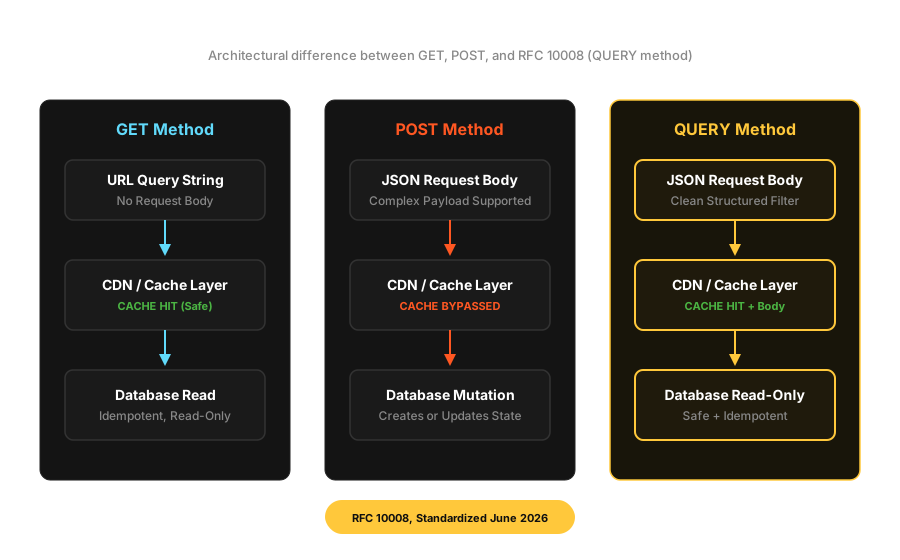
The Server-Layer Trap: Uncovering Uvicorn Parser Internals
Hold on, do not rush off just yet! There is a critical production trap hidden right here. Our very first principle becomes extremely important in this scenario. While the FastAPI code above will work perfectly on your local development machine, it can fail silently once deployed to production. Do you know why that happens?
Uvicorn can operate using two different underlying HTTP parsers. When you install the server using pip install uvicorn[standard], the default parser installed is httptools. This is essentially a Python wrapper around the llhttp parser from Node.js. Think of this parser as a strict school headmaster! It validates method names against a fixed, case-sensitive lookup table. To httptools, an uppercase "QUERY" and a lowercase "query" are completely different strings. If a client mistakenly sends a lowercase "query", httptools fails to recognize it and immediately rejects the request with a 400 Bad Request error before it ever reaches your FastAPI application code!
In contrast, Uvicorn's second parsing option is h11. This is a pure-Python implementation of HTTP/1.1, and it acts like a relaxed, forgiving friend. It does not complain about lowercase HTTP method names and allows the request to pass directly to your application routing layer. If the router cannot find a matching endpoint, it politely returns a 405 Method Not Allowed response instead of outright rejecting the protocol.
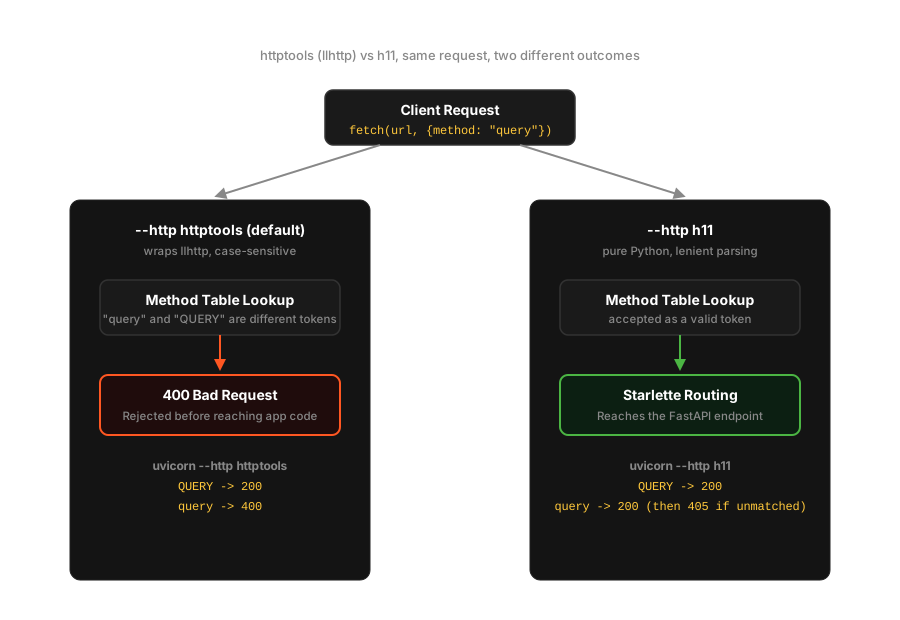
What is the best solution for this mismatch? You should explicitly select your parser in the terminal when launching your server:
# Explicitly select your HTTP parseruvicorn main:app --http httptools # Default, faster performance, but strictly case-sensitiveuvicorn main:app --http h11 # Slightly slower performance, but much more lenientNow, where do these lowercase method names actually come from? The answer lies on the client side of our applications!
Client-Side Gotcha: Why Browser fetch() Keeps Your QUERY Lowercase
Would you like to hear an unusual story about browser fetch() behavior? Inside the WHATWG Fetch specification, there is a specific algorithm step called "normalize a method". The purpose of this step is to automatically convert HTTP method names into uppercase characters. However, realistically, it only normalizes six classic HTTP methods: DELETE, GET, HEAD, OPTIONS, POST, and PUT!
Our new QUERY method is not on that exclusive VIP list because it was created long after those six classic methods were standardized! As a result, if a frontend developer accidentally writes fetch(url, { method: "query" }), the browser sends the method name across the network wire in lowercase exactly as typed! This exact behavior triggered a dedicated issue on the whatwg/fetch repository in June 2026, where engineers are actively discussing whether QUERY should be added to the automatic normalization list.
Therefore, whenever you write client-side fetching logic, make sure you format the method correctly:
const response = await fetch("/products", { method: "QUERY", // You must keep this in uppercase; do not forget! headers: { "Content-Type": "application/json" }, body: JSON.stringify({ category: "phone", brand: "apple" }),});const data = await response.json();If you are sending requests from a Node.js backend to another service, you will be happy to know that Node's internal undici library (which powers the built-in fetch API) officially added QUERY support through a merged pull request in the summer of 2026! That update also included a helpful reference implementation for generating body-aware cache keys. In addition, Node.js has natively recognized QUERY as a valid HTTP method in its core parser since early 2024, starting from versions 21.7.2 and 22+.
If you prefer making requests in Python using httpx, here is how you do it:
import httpx
async with httpx.AsyncClient() as client:    response = await client.request(        method="QUERY",        url="http://localhost:8000/products",        json={"category": "phone", "brand": "apple"},    )
Caching: The Core Promise vs. Today's Reality
The biggest selling point of the QUERY method was always its ability to support caching, right? According to the RFC rules, caching a QUERY response is entirely possible. However, there is a technical catch here! You cannot build your cache key using only the URL string; the request payload body must also be an essential part of that cache key. The RFC specifically warns about a critical security risk where if a caching layer incorrectly normalizes the body and creates a false positive match, one user's sensitive data could be served to a completely different user.
The reality is that as of July 2026, neither Chrome nor Firefox will serve a repeated QUERY request from the browser cache! Browser-level caching for this method is still undergoing standardization discussions, and the Fetch specification has not yet finalized how it will be implemented. That is the real challenge we face today.
Be Careful When Building Custom Caching Layers
If you build your own caching architecture using tools like Redis, CDN edge rules, or reverse proxies, failing to properly hash or normalize the request body can cause two distinct filter queries to share the exact same cache entry! This mistake can lead to severe vulnerabilities like cache poisoning or cache deception. The safest approach is to generate a cryptographic digest of the body (such as SHA-256, following the Content-Digest header format defined in RFC 9530) and append it to your cache key. Discussions surrounding these digest-aware caching mechanisms are currently ongoing inside the IETF HTTP Working Group.
Infrastructure and Ecosystem Adoption: Current Status
This table carries the most practical engineering value in our entire guide. It clearly maps out exactly where you can safely adopt this method today and where you might face technical risks:
| Component | Status (July 2026) |
|---|---|
| Node.js core HTTP parser | Native support available starting from Node 21.7.2 and 22+ |
| Node.js undici / fetch | Support merged, including reference body-aware cache keys |
| nginx | Basic RFC 10008 support has been merged |
| Chrome, Firefox (browser fetch) | Scripted fetch works reliably, but browser caching is not yet implemented |
| Kong Gateway | Method names must be uppercase; native QUERY awareness is currently emerging |
| AWS API Gateway | No native support yet; only supports GET, POST, PUT, PATCH, DELETE, HEAD, and ANY. Using the ANY workaround carries risks of body stripping or 403/405 errors |
| Spring Framework | Issues and pull requests to add support remain open |
| Ruby on Rails | Community proposals are under active discussion, but not yet merged |
| Eclipse Jetty, Apache Tomcat | Support issues are open with active development underway |
| OpenAPI tooling | Documented in OpenAPI 3.2, but Swagger UI and ReDoc rendering remains incomplete |
Keep Production Readiness in Mind
Looking at this adoption table explains why you should not immediately migrate all your public-facing, browser-dependent traffic to QUERY today. For server-to-server communication, especially between Node.js and properly configured Python backends, it is 100% reliable right now. However, until you verify that every layer in your network infrastructure (including clients, CDNs, API Gateways, WAFs, and backends) fully supports the method, you must keep POST /search available as a reliable fallback for public APIs.
Security Considerations
Designating QUERY as a safe HTTP method means that many infrastructure components, such as Web Application Firewalls, rate limiters, and CSRF protection mechanisms, will automatically treat it as harmless and non-mutating, exactly like a GET request. If a flawed backend implementation accidentally includes real state mutations inside a QUERY handler, it creates a severe security vulnerability because external protection layers will treat the operation as CSRF-exempt. Additionally, older WAF and reverse proxies handle unfamiliar HTTP methods inconsistently. Some security systems block unrecognized methods completely, while others pass them through without inspection. Handle this architecture with extra care!
Migration Strategy: How to Adopt Step by Step
You do not need to migrate your entire system in a single leap! A realistic and smart engineering approach is to implement dual-support. Your backend can expose the exact same search business logic across two distinct endpoints:
@app.api_route("/products", methods=["QUERY"])async def query_products(request: Request, payload: ProductQuery):    return await run_search(payload)
@app.post("/products/search")async def post_search_fallback(payload: ProductQuery):    return await run_search(payload)
On the client side, start by sending an OPTIONS /products request to inspect the returned Allow header. If you see that QUERY is supported, go ahead and use it confidently. If it is not listed, quietly fall back to your POST /products/search endpoint. This automated feature detection allows your application to migrate smoothly as the surrounding ecosystem matures, without requiring any hard cutovers!
QUERY vs. GraphQL: Clearing Up a Common Misconception
Many developers assume that the QUERY method was designed to replace or eliminate GraphQL. That is not true at all; these two technologies operate at completely different layers of the network stack.
GraphQL is a query language and schema system that typically sits on top of a single POST endpoint. In contrast, the QUERY method itself is not a query language. It is simply an HTTP protocol method at the transport layer that can transport any query language, including GraphQL, with correct HTTP semantics. In the future, GraphQL servers could choose to use QUERY instead of POST to take full advantage of HTTP caching and idempotency mechanisms. However, doing so will not change GraphQL's underlying syntax or schema design in any way. Does that distinction make sense?
Testing and Tooling Checklist
Keep an eye on how the following tools handle custom methods when building your testing workflows:
- curl: Supports the method directly using the
-X QUERYflag, making it the most reliable tool for quick command-line testing. - httpx (Python): Works smoothly when using the syntax
client.request(method="QUERY", ...)inside your scripts. - k6: Natively supports custom HTTP methods, making it an excellent choice for performance and load testing.
- JMeter: Does not include QUERY in its default dropdown lists, requiring you to manually configure custom properties inside the HTTP sampler.
- Postman and Swagger UI: Current behavior remains somewhat inconsistent because OpenAPI tooling has not fully caught up yet, so avoid relying on them blindly without verification.
Summary Production Checklist
- Explicitly configure your ASGI server HTTP parser, ensuring you use the exact same parser engine in both your testing and production environments.
- Always format your method name as uppercase
"QUERY"in frontend fetch requests, and thoroughly test CORS preflight behavior using appropriateallow_methodsconfigurations. - Implement strict
Content-Typevalidation, rejecting invalid requests immediately with a400,415, or422status code at the handler gate. - Provide clear endpoint discoverability by returning
Accept-QueryandAllowheaders inside yourOPTIONSresponses. - Never rely blindly on automatic browser caching; if you build a custom caching layer, always include a cryptographic digest of the request body inside the cache key.
- Verify exactly how your Web Application Firewalls, API Gateways, and CDNs handle custom methods along your network routing path, especially when using managed services like AWS API Gateway.
- Maintain
POST /searchas an active fallback endpoint for public-facing APIs until every infrastructure layer in your architecture guarantees native support.
A Simple Analogy to Wrap Everything Up
If this entire architectural concept still feels slightly confusing, remember this simple comparison:
The GET method is like sending an open postcard through the mail. Your writing space is strictly limited, and anyone along the delivery route can read what you wrote, but sending it is fundamentally safe and harmless.
The POST method is like sending a tightly sealed parcel box that contains explicit instructions to create, build, or modify something at the destination.
Our new friend, the QUERY method, is like submitting a detailed, multi-page book requisition form to a library reference archive! You are not asking the librarian to modify, write in, or destroy any library books; you are simply providing complex search criteria to help them locate the exact information you need. The only catch is that this archive filing system is brand new, so while some library counters are already processing the new forms smoothly, other desks have not been trained on what the form looks like yet! That makes the difference intuitive and easy to grasp, does it not?
Frequently Asked Questions
Will the QUERY method completely replace POST?
Not at all! It is designed solely to fill the specific architectural gap where safe, read-only operations require a request body. For any operation that changes server state or modifies resources, classic methods like POST, PUT, PATCH, and DELETE will continue to rule as standard practice.
Can we use this in production today?
For server-to-server communication, especially in internal architectures where your team controls both the client sending the request and the backend server processing it, you can adopt it with 100% confidence right now. However, for public-facing APIs accessed by web browsers, you should proceed cautiously due to the infrastructure limitations outlined in our adoption table.
Final Thoughts and Best Wishes
We have covered quite a lot of technical ground today! I hope this complete deep dive has made the mechanics of the QUERY method crystal clear for you. Seeing an elegant engineering solution finally arrive for a 16-year-old protocol limitation is truly exciting, is it not?
Please let me know if you plan to experiment with the QUERY method in your next backend project! If you ran into any confusing points or have additional questions about implementation details, drop a quick comment below so we can discuss it. Thank you very much for spending your valuable time reading through this comprehensive architectural guide, and I wish you the best of luck with your software builds!
References
Specification:
- RFC 10008, The HTTP QUERY Method (IETF): https://www.rfc-editor.org/info/rfc10008
- HTTP Semantics, RFC 9110: https://www.rfc-editor.org/rfc/rfc9110.html
- Content-Digest header field, RFC 9530: https://www.rfc-editor.org/rfc/rfc9530.html
- IANA HTTP Field Name Registry (Accept-Query): https://www.iana.org/assignments/http-fields
Implementation and Ecosystem Discussions:
- FastAPI Discussion #5520, APIRouter HTTP Method Query: https://github.com/fastapi/fastapi/discussions/5520
- Uvicorn httptools_impl.py Source Code: https://github.com/Kludex/uvicorn/blob/main/uvicorn/protocols/http/httptools_impl.py
- Node.js undici, QUERY method support (merged PR): https://github.com/nodejs/undici/pull/5459
- WHATWG Fetch, Issue #1938 (method normalization, CORS, caching): https://github.com/whatwg/fetch/issues/1938
- Mozilla Standards Positions, RFC 10008: https://github.com/mozilla/standards-positions/issues/1430
- Spring Framework, QUERY method support issue: https://github.com/spring-projects/spring-framework/issues/36988
- Ruby on Rails, QUERY method proposal discussion: https://discuss.rubyonrails.org/t/proposal-support-for-the-http-query-method-rfc-10008/91255
- Ecosystem Adoption Tracker, QUERY Method: https://github.com/jeswr/http-query-adoption
- AWS re:Post, HTTP QUERY Method and API Gateway: https://repost.aws/questions/QUMU66SxOLT1qXBVZaBHCtxA/http-query-method General Reference:
- MDN Web Docs, HTTP Request Methods: https://developer.mozilla.org/en-US/docs/Web/HTTP/Methods