How Cursor Pagination Actually Works Under the Hood

On this page
Let us think about a familiar engineering scenario where your API design and database query feel absolutely perfect. You have a posts table with 50 million records. When you load the first page, the database returns 20 rows incredibly fast, taking just 2 milliseconds.
SELECT *FROM postsORDER BY created_at DESCLIMIT 20 OFFSET 0;This query performs brilliantly at first. But the real trouble begins when a user or an automated crawler tries to access a page located much deeper in the dataset.
SELECT *FROM postsORDER BY created_at DESCLIMIT 20 OFFSET 1000000;Suddenly, your API latency skyrockets. The database CPU usage hits 100 percent, and requests start timing out one after another. You might naturally ask yourself why the query gets so slow as the page number increases, especially since the API is only returning 20 rows. It is highly important to understand why the database works so hard despite the LIMIT 20 clause, and why deep pagination remains expensive even when you have an index.
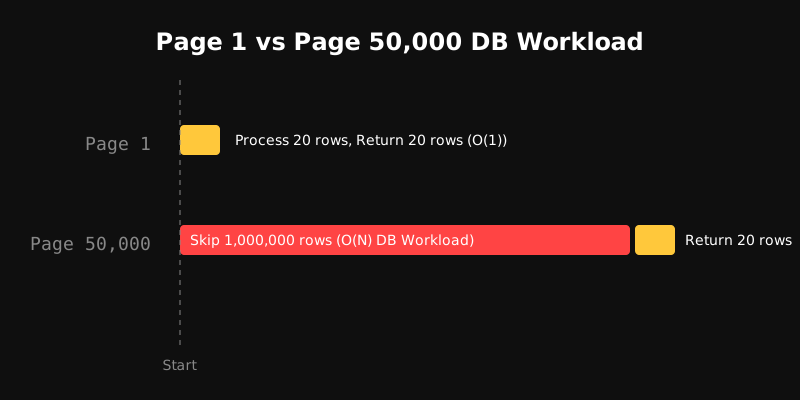
We are going to investigate this performance incident by looking inside the database to see exactly how cursor pagination solves this problem.
What Problem Does Pagination Actually Solve?
If you only view pagination as a frontend UI feature, you miss its core engineering purpose. You need to view it as a scalability boundary for both your database and your API. Imagine you have 50 million records in your system. If you try to return all that data at once, you will face three major crises:
- Database Memory and I/O Saturation: Your database buffer pool will run out of memory trying to load the entire table.
- Network Bandwidth Choke: Your network pipeline will jam up trying to transfer a gigabyte-sized JSON payload.
- Client-side Browser Crash: The client browser or mobile app will freeze and crash because it cannot handle that massive DOM or memory footprint.
Instead, we break the entire dataset down and return it in smaller chunks. The real goal of pagination is to guarantee a bounded amount of work for the database and a bounded response size for the API. When we decide to return 20 records, the next obvious question is which 20 records. The answer to that specific question is exactly what creates strategies like offset and cursor pagination.
The Offset Pagination Mental Model
Let us first talk about the model we are all most familiar with. With offset pagination, we tell the database exactly how many rows it needs to skip.
SELECT *FROM postsORDER BY created_at DESCLIMIT 20 OFFSET 10000;Many developers think OFFSET 10000 means the database just jumps or teleports directly to the 10,000th row. However, relational databases simply do not work that way.
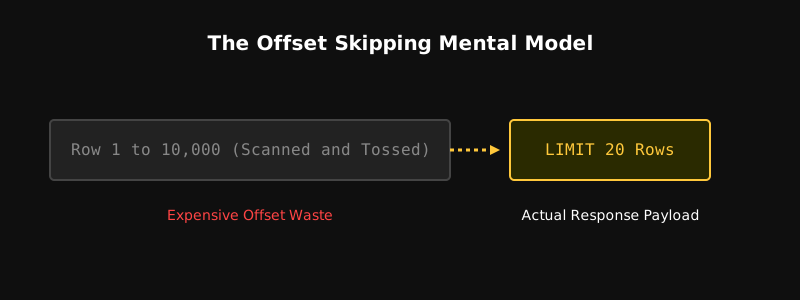
In reality, the database has to scan the previous 10,000 rows within the ordered result one by one, pull them into memory to count them, and then throw them away. After that, it starts from row 10,001 and returns the next 20 records as requested by the LIMIT clause. This means the database actually had to process 10,020 rows just to give you 20 rows.
How LIMIT and OFFSET Are Actually Different
We need to build a very important mental model right here. LIMIT and OFFSET issue two completely different instructions to the database.
LIMITtells the database the maximum number of rows to return to the client.OFFSETtells the database how many valid rows it must pass through before it even starts collecting data.
When you use OFFSET 0, OFFSET 100, and OFFSET 1,000,000, the returned row count is always 20, but the total amount of work the database performs is entirely different. As the offset value grows, the database has to scan and discard more rows from memory, which makes the query progressively slower.
Looking Inside the Database Execution Plan
A SQL query is just declarative syntax. The database engine transforms it into an internal execution plan. You can observe this actual behavior in PostgreSQL using the EXPLAIN ANALYZE command.
EXPLAIN ANALYZESELECT *FROM postsORDER BY created_at DESCLIMIT 20 OFFSET 100000;In this execution plan, the query planner follows a specific pipeline:
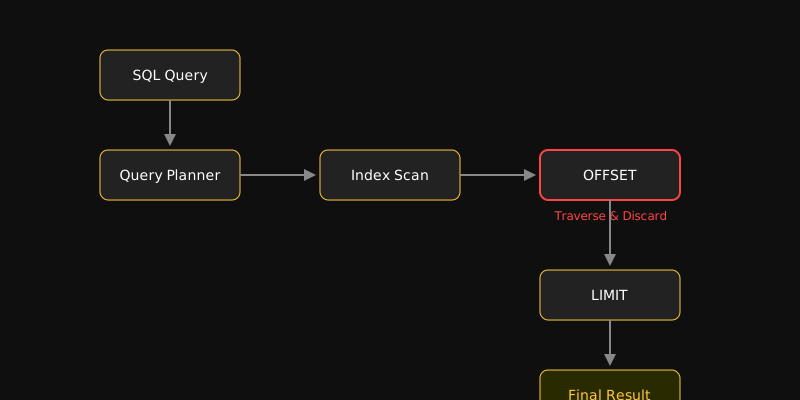
- Access Path Selection: The planner decides whether to perform an index scan or a full table scan.
- Tuple Retrieval: It fetches 100,020 tuples from the disk or buffer cache using the index.
- Traverse and Discard: It counts the first 100,000 tuples in memory and throws them away.
- Limit Slice: It collects the remaining 20 tuples to build the final output.
When we look at the EXPLAIN ANALYZE output, it becomes clear that the database spent a massive amount of CPU cycles pulling disk pages into memory just to throw that unnecessary data away.
Does an Index Solve the OFFSET Problem?
This is a very common misconception in backend engineering. Many developers assume that creating an index on the created_at column will permanently solve the deep pagination problem.
CREATE INDEX idx_posts_created_atON posts(created_at DESC);Using an index means the database might avoid a full sequential table scan, as it can pull ordered entries directly from the index tree. However, the logical requirement of the OFFSET clause does not just disappear.
To reach the target position, the database still has to traverse every single preceding entry through the index leaf pages. As a result, the query execution time continues to grow linearly even with an index in place.
The O(N) Pagination Trap
Even though an index scan is fast, the database still has to read N index entries to reach OFFSET N. Offset-based pagination fundamentally creates O(N) time complexity, which causes catastrophic latency on large datasets.
Why Deep OFFSET Becomes a Production Problem
Think about a realistic production traffic scenario. A regular user will rarely trigger a deep pagination query. But things spiral out of control when search engine bots, scrapers, or thousands of concurrent users send requests for deep pages.
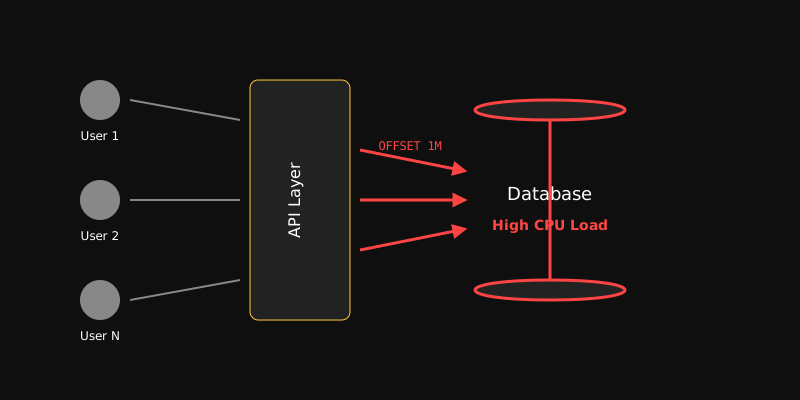
Multiple users requesting deep offsets creates a continuous heavy workload on the database engine. This leads to several failures:
- Database CPU usage hits 100 percent.
- The database connection pool gets completely exhausted.
- New lightweight requests get stuck in the queue, causing cascading latency.
- Clients experience timeouts and send automatic retries, which creates a death spiral of even more system load.
The Entry Point of Cursor Pagination
The concept of cursor pagination comes directly from this fundamental limitation of offset. If we stop telling the database how many rows to skip and instead tell it where we left off, the database workload changes completely.
- Offset Approach: Pass 10,000 rows and give me the next 20 rows. (The database has to look at 10,020 rows).
- Cursor Approach: I have seen up to this specific record, so give me the next 20 rows after it. (The database starts right at that exact point and only reads 20 rows).

This is the core architectural transition of cursor pagination. Instead of forcing the database to scan and discard thousands of records, we provide it with a known boundary or starting point.
API Cursor vs. Database Cursor
We need to clear up some terminology confusion right here. The cursor used in API pagination is not the same thing as the internal cursor of a database engine.
- API Cursor: This is a stateless token that represents the current pagination position, passed back and forth between the client and the server.
- Database Cursor (PL/pgSQL / SQL Cursor): This is a stateful connection-bound pointer kept open in the database server memory. Keeping this open for a long time will exhaust your connection pool.
When designing web applications or distributed APIs, we always use the stateless API cursor.
Where Keyset Pagination Comes In
The terms keyset pagination and cursor pagination are often used interchangeably, but there is a subtle structural difference between them.
SELECT *FROM postsWHERE id < :lastIdORDER BY id DESCLIMIT 20;Keyset pagination is the database-level query filtering strategy, where the sorting column value acts as a boundary in the WHERE clause. Cursor pagination is the API-level transport mechanism that packages these keyset values into a secure, encoded token to send to the client.
Why Stable Ordering is the Core Requirement of Cursor Pagination
The most fundamental requirement for cursor pagination to work correctly is deterministic and stable ordering. Sorting by a single non-unique column can lead to a disaster.
ORDER BY created_at DESC;Imagine three different posts inserted into the database at the exact same second (10:00:00). Because their created_at timestamps are identical, they have no specific internal order to the database engine.
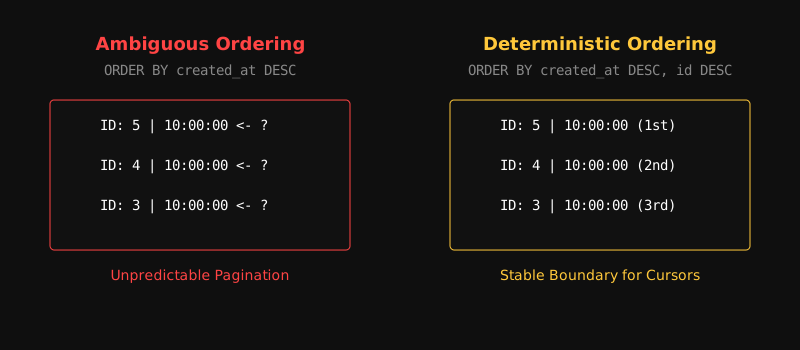
The database gives no guarantee about which two records will appear on the first page and which one will end up on the second page. This means some records might show up as duplicates, while others might be skipped forever. To solve this problem, you must always use a unique column as a tie-breaker.
ORDER BY created_at DESC, id DESC;Here, the id column guarantees that the position of every single row is completely unique and deterministic.
Composite Cursor and Row Value Comparison
When you sort your pagination by multiple columns, like created_at and id, your cursor needs to include both of those values. This is called a composite cursor.
SELECT *FROM postsWHERE (created_at, id) < (:createdAt, :id)ORDER BY created_at DESC, id DESCLIMIT 20;Modern relational databases like PostgreSQL and MySQL 8+ support row value comparison, also known as tuple comparison, incredibly well. The database compares the created_at values first. If two rows share the same created_at time, only then does it compare the id values to filter the next records.
For database engines that lack tuple syntax support, you can write the equivalent logic like this:
SELECT *FROM postsWHERE created_at < :createdAt OR (created_at = :createdAt AND id < :id)ORDER BY created_at DESC, id DESCLIMIT 20;Row Value Syntax Support
Row value comparison (A, B) < (X, Y) keeps your code clean and allows the SQL query optimizer to use your composite index perfectly.
Why a Composite Index is Critical Here
Running a keyset query without the right index will trigger a full table scan instead of giving you a performance boost. You must create a composite index that aligns perfectly with the filtering and ordering of your cursor query.
CREATE INDEX idx_posts_cursorON posts(created_at DESC, id DESC);Because of this index, the database engine never has to sort data in memory, and it never has to discard any rows. The engine jumps straight to the exact boundary point on the index tree and picks up the next 20 entries.
The Connection Between B-Trees and Cursor Pagination
A relational database B-Tree index is essentially a balanced tree structure that always keeps your data sorted.
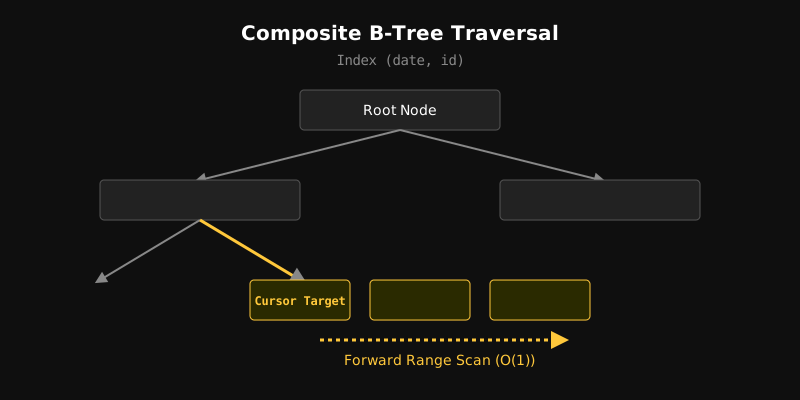
Notice how a cursor query executes inside a B-Tree index:
- Tree Seek (O(log N)): The database moves down from the root node like a binary search to find the exact leaf node matching the cursor value.
- Sequential Leaf Scan (O(K)): The leaf nodes are connected to each other like a doubly linked list. The database simply follows the forward pointer and reads exactly K rows based on your limit.
Since K is a fixed limit like 20, the query performance stays completely flat, operating near O(1), no matter if your table has ten thousand or ten million rows.
Concurrent INSERT and Pagination Drift
The most severe data consistency issue with offset pagination is pagination drift, also known as data shifting.
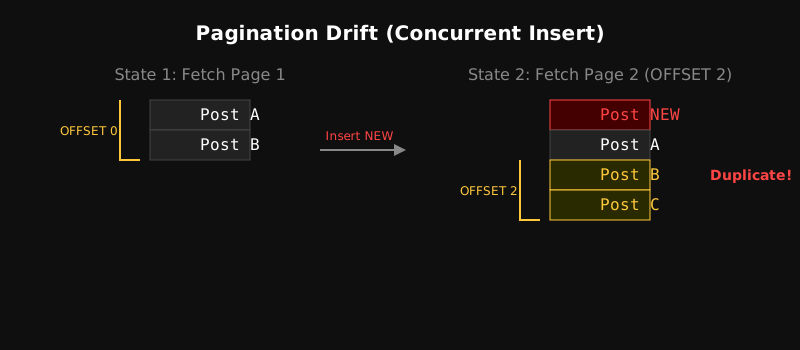
Suppose a user loads page 1 and sees Post A and Post B. At that exact moment, another user inserts a new post into the system.
Now, when the first user sends a LIMIT 2 OFFSET 2 request to view page 2, the database shifts the entire dataset backward because of that new row. As a result, the user sees Post B again on page 2 as a duplicate record. Similarly, if a row gets deleted, a different record might be skipped entirely.
Cursor pagination is completely immune to this drift problem. It does not rely on imaginary row numbers; instead, it reads data by locking onto the boundary point of a specific data value.
Immutable vs. Mutable Ordering
You should ideally pick columns that never change, like id or created_at, for cursor pagination. But if you sort by a mutable column like updated_at, you can fall into a specific concurrency trap:
ORDER BY updated_at DESC, id DESC;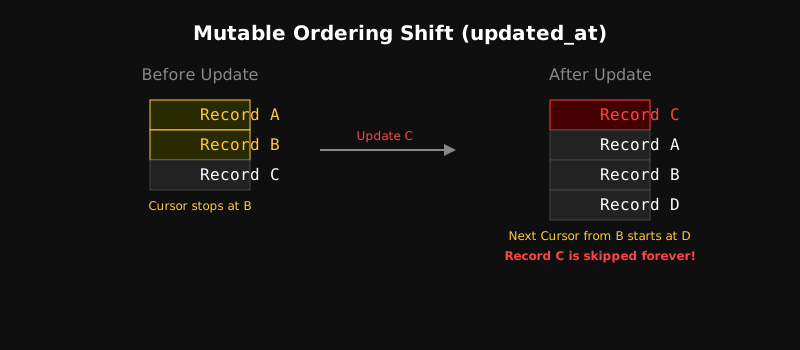
Imagine a user reads page 1 and stops at Record B. Meanwhile, Record C, which was on page 3, gets updated. Its updated_at timestamp increases, pushing it to the top above page 1. Now, when the user requests the next page starting from Record B, the database will return Record D and everything after it. As a result, the user will skip Record C completely.
Mutable Column Strategy
If you have to paginate on a changing column, you need to consider a real-time data sync strategy for clients or implement snapshot isolation.
How Cursors Work in an API (Opaque Cursors)
In a production-grade system, you should never expose your internal database schema or raw column values directly to the client.
{ "created_at": "2026-09-06T01:30:00Z", "id": 9842}Instead of sending raw data, the server encodes it into an opaque token to send to the client:
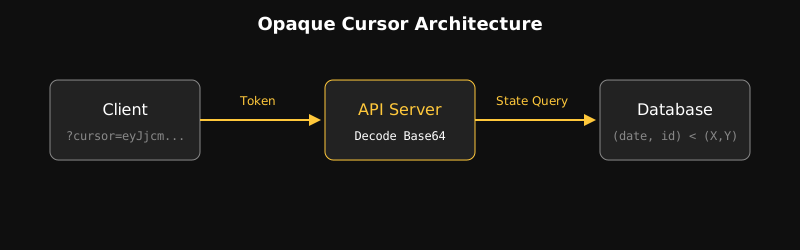
GET /api/v1/posts?cursor=eyJjcmVhdGVkX2F0IjoiMjAyNi0wOS0wNlQwMTozMDowMFoiLCJpZCI6OTg0Mn0=When the API server receives the request, it decodes and validates the token to build the internal SQL query. This ensures that if you change your database schema or pagination logic later, your public API contract will not break.
Security Note
Base64 is an encoding mechanism, not encryption. Anyone can decode the token and read the values inside. To prevent token tampering or security risks, the best practice is to sign the cursor with an HMAC or fully encrypt it.
How to Figure Out hasNextPage
Many developers run a separate COUNT(*) query just to tell the client if there is a next page. However, running a count query on a massive table is highly expensive. The smartest solution for this is the LIMIT + 1 trick.
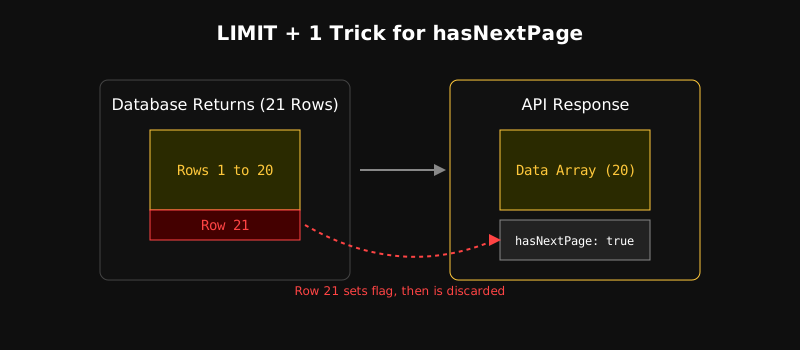
If your page size is 20, you simply query 21 records from the database using LIMIT 21.
- If the database returns exactly 21 records, it means there is still more data left, so
hasNextPage = true. The server removes that 21st record from the response, sends the first 20 records to the client, and uses the data from the 20th record to generate thenext_cursor. - If the database returns 20 records or fewer, then
hasNextPage = falseandnext_cursor = null.
Forward and Backward Pagination
A complete API needs to let users go backward to previous pages, not just forward.

To support this, the API response provides two cursors: next_cursor and prev_cursor.
-
Forward Query:
SQL WHERE (created_at, id) < (:createdAt, :id)ORDER BY created_at DESC, id DESCLIMIT 21; -
Backward Query:
SQL WHERE (created_at, id) > (:createdAt, :id)ORDER BY created_at ASC, id ASCLIMIT 21;
For the backward query, the database pulls the data in ascending order. The application layer then reverses that array before sending it back to the client in the expected sequence.
Cursor Pagination with Filtering and Sorting
Real-world production APIs involve filtering and dynamic sorting:
GET /api/v1/posts?author_id=42&status=published&sort=views&cursor=...You need to keep two things in mind here:
- Composite Index Alignment: You must have a composite index on your filter and sort columns together, such as
(author_id, status, views DESC, id DESC). - Context Binding: If the user changes their sort option, their previous cursor will no longer work. You should bind query parameters or a filter hash inside the cursor token. This allows you to throw a validation error if a client tries to use an old cursor with a new sorting context.
Cursor Pagination in a Distributed System
Managing global pagination becomes quite a challenge when your database is divided into multiple shards or partitions, like in CockroachDB, Citus, or sharded MySQL clusters.
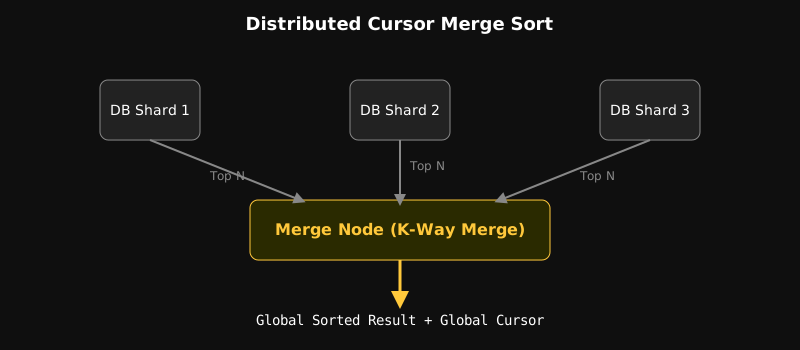
Each database shard returns its own ordered data based on its local index. The API gateway or merge node runs a K-Way merge sort algorithm to select the top 20 records, creates a unified global cursor, and sends it back to the client.
Performance Benchmark and Production Architecture
When a high-traffic system is migrated from deep offset to indexed cursor pagination during a production incident, the results are incredible.
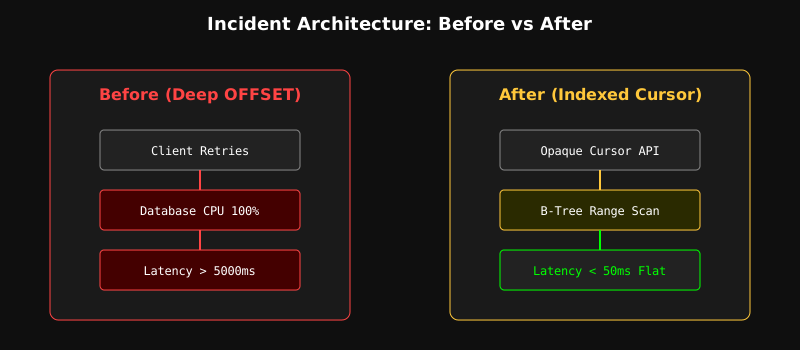
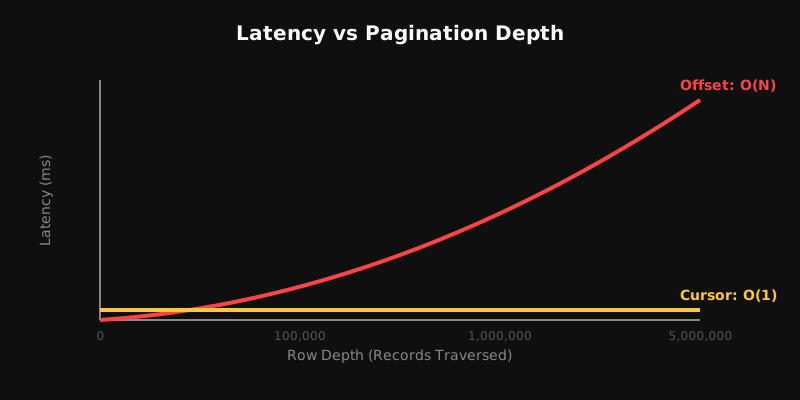
- Offset Approach (O(N)): As the page depth increases, the p95 and p99 latencies climb steeply.
- Cursor Approach (O(1)): The response time for the first page and the one-millionth page is exactly the same, staying completely flat under 50 milliseconds.
Random Page Access Trade-off
The only limitation of cursor pagination is that it does not support random access like jumping straight to page 5000. Offset is a reasonable choice for small datasets or back-office admin panels where users need to jump to specific page numbers. However, cursor pagination remains the only standard solution for infinite scrolls, content feeds, or high-scale public APIs.
Final Mental Model and Production Checklist
Remember the core formula of this entire architecture:
The Scalability Equation:
Deterministic Order + Matching Composite Index + Keyset Boundary + Bounded LIMIT = O(1) Scalable Pagination.
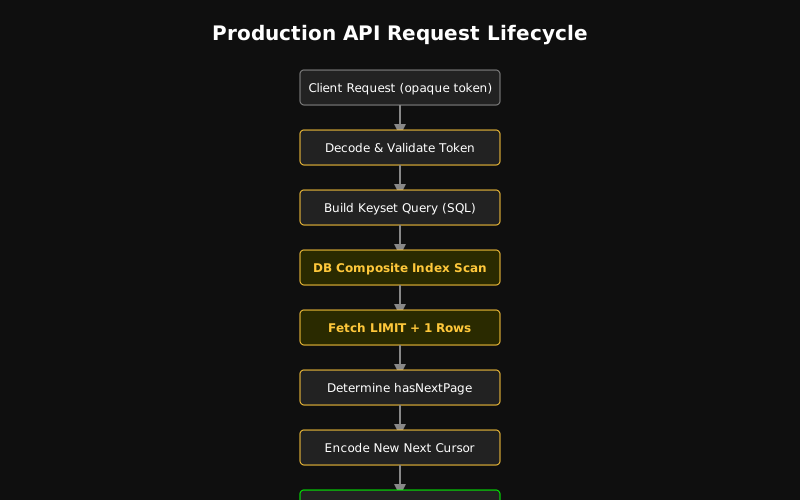
Your Production Readiness Checklist
- Deterministic Tie-Breaker: Always add a unique column, like
idor auuid_v7, to yourORDER BYclause. - Matching Index: Create a composite index that matches the column sequence of your
WHEREandORDER BYclauses. - Opaque Tokens: Hide your internal database state by using Base64 encoded or HMAC signed cursor tokens.
- LIMIT + 1 Pattern: Avoid running separate
COUNT(*)queries and determine your next page using theLIMIT + 1pattern. - Context Validation: Write logic to reject old cursors if the client changes their filters or sorting.
- Immutable Sort Fields: Sort your pagination using immutable columns whenever possible.
- EXPLAIN Verification: Before deploying to production, run
EXPLAIN ANALYZEto guarantee that your query is using an index scan and is not discarding unnecessary rows.
Cursor pagination is not just an API pattern. It is a powerful system architecture design that forces the database engine to work in a bounded, index-friendly way.